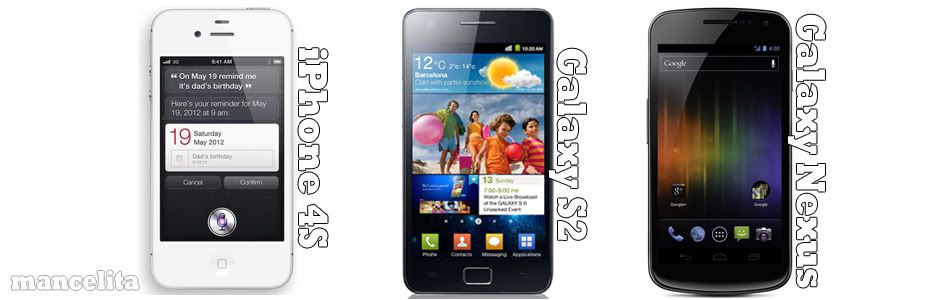

iPHONE 4S WITH THE SAME SHAPE, DIFFERENT BRAIN

The changes to the iPhone 4S are easy to document - the camera has been upgraded to 8MP (with an improved aperture ratio), the CPU is now the same dual-core A5 processor as seen in the i Pad 2, and a seven time increase in graphical processing power. Apple has slightly changed the design of the iPhone 4S somewhat though ...

APPLE PREPARING TO ERASE THE ITUNES MATCH BETA LIBRARIES ON SATURDAY

Apple has already notified its developers that they are going to erase the matched libraries of the iTunes Match service on Saturday. This erasing of the pre- release libraries is again being done related to the new release of iTunes match ....

iPHONE 4S-THE BEST SMARTPHONE SELLING IN THE WORLD

The new iPhone 4s has a new operating system - the iOS 5, a better camera, a new A5 processor, 1080 HD video with real-time video capability, a CMDA+GSM chip, Infinity Blade 2 and a download speed that is seven times better than the iPhone 4. As far as the quality of pictures from the iPhone's camera is concerned, the iPhone 4S does give one the luxury of ...

APPLE STARTS SELLING UNLOCKED IPHONE 4S IN US

Waiting to buy an iPhone 4S with no contract attached on it? Then it is great news for them who have been patiently waiting for unlocked phones. From November 12, 2011 onwards Apple US store is offering you the Contract-free, pristine new unlocked iPhone 4S’s...

21 TRICKS AND TIPS TO GET THE BEST FROM YOUR IPHONE

Got used to your new iPhone or still facing the intricacies in using it? Here is a list of 25 unique and quite interesting tips that are really going to be of great help in your journey ahead with your wonder phone. Well the list contains 21, but the functions seem to be endless, whether it’s making calls, watching a movie or surfing the net. After weeks of usage and a little bit of feature digging, the iPhone has come up with the following tips and tricks ...

Whats New in iPhone 4S

Showing posts with label iphone. Show all posts

Thursday, 15 December 2011

iPhone bug allows stolen phones to receive iMessages even after remote wipe


Scattered reports have emerged that stolen iPhones continue to receive iMessages intended for their original owners even after changing numbers, resetting Apple ID passwords and remote wiping the handsets.
ArsTechnica looked into the matter earlier this week after a reader reported experiencing the issue.

According to the report, a stolen iPhone 4S continued to receive the reader's wife's iMessages after the couple had deactivated the device with the carrier and remote wiped it. The contraband handset had even been resold and activated under a new number.


Apple released iMessage as part of iOS 5 in October. The service, which allows for free messaging between iOS users, has been much discussed because it poses a threat to wireless carriers' SMS revenues.


The issue does not appear to be an isolated incident, as multiple support threads (
1, 2) on Apple's website have cropped up regarding the problem. Some users suggested that wiping an iPhone when the original SIM card is still in the device won't result in a clean reset, thereby allowing the iMessage feature to reactivate when the phone is restored.

Apple has yet to respond to a request for comment, but report author Jacqui Cheng did speak with iOS security expert Jonathan Zdziarski about the bug.


"I can only speculate, but I can see this being plausible," he said. "iMessage registers with the subscriber's phone number from the SIM, so let's say you restore the phone, it will still read the phone number from the SIM. I suppose if you change the SIM out after the phone has been configured, the old number might be cached somewhere either on the phone or on Apple's servers with the UDID of the phone."

 
One user experiencing the issue claimed to have resolved it by canceling his old Apple ID completely, but the solution would be unacceptable to most customers, as it entails abandoning any iTunes and App Store purchases tied to the account.

Twitter user Kim Hunter told the publication that a representative from Apple's security unit had denied that it was a security problem, offering the relatively unhelpful solution of turning iMessage off on the offending device.


Apple has experienced minor issues with several of its new product rollouts this fall. iCloud, for instance, has been subject to intermittent outages. The company is also working on a software fix for battery life in iOS 5 after an initial fix failed to completely resolve the issue.


Most recently, the international iTunes Match launch got off to a false start on Wednesday ahead of its official release on Thursday.

Google says you’ll be soon able to hangout from your iPhone on any Google+ post


Google’s Vic Gundotra just announced on his Google+ page a host of new Hangouts features meant to “go beyond the status update”. In short, you can now hangout on any post (an invitation will be added to the comments), call any phone number in the world and conference in anyone (free calling to US and Canada, international calling rates are “super, super low”), plus initiate a hangout session from the official Google+ iOS app by tapping the new hangout icon.

The executive also shared an interesting milestone for Hangouts on Air, saying “hundreds of people” white listed as part of their trial now have the ability to broadcast their hangouts to the world. “Our goal is to enable this for everyone on the planet”, Gundotra noted. You will also be able to automatically record Hangouts on Air session and upload it to a private YouTube account for later viewing. These features require a new Google+ app, “coming soon” to the App Store. The official Google blog has more information.

Wednesday, 14 December 2011

Cool Gadget adds AirPrint iDevice printing to any printer


Till now, HP has held a huge advantage over its printer rivals when it comes to printing from the iPad — because even though rivals have made strides with their own apps (like Epson’s slick iPrint app) HP’s printers remain the only ones with AirPrint, which is tied directly to iOS and allows printing from within apps, without having to use an intermediary app (eg iPrint).

But that’s all changed with todays unveiling of the Lantronix xPrintServer, a $150 plug-n-play box that gives any printer AirPlay connectivity.

That means any printer, no matter the make — and even those without native wifi capability — can be turned into an AirPrint-enabled wifi printer just by connecting it to the iPhone-sized xPrintServer. It’s not available yet, but should ship early next year and can be pre-ordered from the company’s website.
Here’s the press release. Oh, and check this clip. It isn’t super informative, but it’s funny, especially the parts with the IT guy, who bears a striking resemblance to our own Adam Rosen.

Tuesday, 13 December 2011

Syncing Plain Text App for iPhone

Speed Notes Is a Dropbox-Syncing Plain Text App for iPhone

iOS: Speed Notes is a plain-text editor for the iPhone that instantly syncs your notes with your Dropbox account for easy note creation and editing on the go or from your computer.

Speed Notes isn't the first cloud-syncing note-taking app for the iPhone by any means, so let's look at the options. Our perennial favorite is Simplenote, which syncs notes to a web-based backend that is the backbone of the Simplenote service. I've been a big Simplenote supporter for a while now, but it does require signing up for a separate service, and chances are you already have Dropbox running on your machine. So how about your Dropbox options. You've got:

  • Previously mentioned Nebulous Notes ($4): This is a kitchen-sink style app. It's full of bells and whistles, letting you choose themes, define macros, and even code from your iPhone. It's solid, but not really my favorite.
  • PlainText (Free): Yes, it's free, but it also places ads over your notes. If you use your note-taking app a lot (which we do), this is a dealbreaker. For a quick $2 in-app purchase, though, you can remove those ads. Looks-wise, I'd call this my favorite of the Dropbox syncers. Functionally, though, it's not.
  • Last, there's Speed Notes. The most likable thing about Speed Notes is that it copies its basic functionality from Notational Velocity (our favorite desktop note-taking app for Mac; copied by previously mentioned ResophNotes for Windows). It has one main input box, and you type into it to search notes or create a new note. You can use it to create and edit notes in any folder in your main Dropbox directory, and everything else works pretty simply and as expected. The main downside to Speed Notes is that it could use a little polish in its look. It's not hideous, but it's clearly not made by a designer. Also, pal-of-Lifehacker and MetaFilter creator Matt Haughey loves Speed Notes.

Whichever you pick will likely be a matter of personal taste, but whether you go for Simplenote or one of your Dropbox-syncing options, I'd highly recommend downloading one of these apps and integrating it into your note-taking and list-making workflows. For a larger explanation of why apps like these are so great, my previous love letter to Simplenote is a good place to start.

If you've got a favorite tool for the job, let's hear about it in the comments.

[Via Life hackers]

Siri’s Speak Selection Feature Reads Text Out Loud

Here’s a nice little tip for Siri fanatics. Did you know that you can have Siri speak any selection of text out loud anywhere in iOS 5 on the iPhone 4S?

By enabling a nifty feature in Settings, a simple “Speak” option can be shown any time you select a chunk of text. Siri can then read that text out loud through your iPhone’s speaker at a pre-programmed speed.

If you navigate to Settings, General, Accessibility, and then Speak Selection, you can enable the Siri feature on iOS 5. Once you turn the setting on, you can set the speed that you want Siri to read text back to you.

Siri will give you a test reading very time you move the slider to change the speed. This will let you determine which speed is best for you. I find that placing the slider at about the 20% mark is the best setting for having Siri read back to you at a normal pace. Make sure your iPhone’s speaker volume is turned up high enough so that you can actually hear when Siri reads.

This is a great tip for reading messages in the car or listening to longer emails. Let us know what you use it for in the comments below!

[Via iDownload Blog]

Coffee Faucet Controlled By An iPhone

Danish company Scanomat has introduced the TopBrewer, an iPhone-controlled coffee faucet. The tap is part of an advanced brewing system that can be built into any tabletop.
The company has patented the world's smallest milk foamer which heats milk on-demand and foams it to the correct texture. The brewer cleans itself after each cup, and can dispense drinking water, cold or hot milk, steam, or a wide variety of coffee drinks; all of which can be ordered up from an iOS app or a touch-screen panel built into the tabletop.

Envision being able to control your coffee machine with a device you already have in your pocket. With TopBrewer this is made possible with our smartphone application for your iPhone.
Quickly connect to the machine and select from the available drinks – or have your own favorite coffee pre-programmed and dispense it just the way YOU like it.
The app gives you full control of the machine and displays status messages when woken up from standby till it’s ready to brew.
Have complete control of your TopBrewer and experience a new sensation when selecting your coffee. You can even explore our model lineup and order more coffee when you run out.

Scanomat has not released pricing or availability information, but the TopBrewer appears to be aimed at offices and high-end luxury homes.

Buying Apple device over the holidays? Check out updated delivery dates

Apple this afternoon revised holiday ordering and shipping deadlines for this year, as spotted by The Loop. For those looking to order customized Macs, you have until tomorrow, December 14, to place an order for your customized all-in-one system if you want to receive it by December 24, with free 2-3 day shipping. With custom engraved iPods you have until December 19 to receive it by the December 24 deadline.
And lastly, for off the shelf Macs and other Apple products you have until December 21 to receive them by Christmas Eve. Sadly, it doesn’t look like you’ll be able to get an iPhone 4S online before the holidays. Find all of the dates after the break:

Monday, 12 December 2011

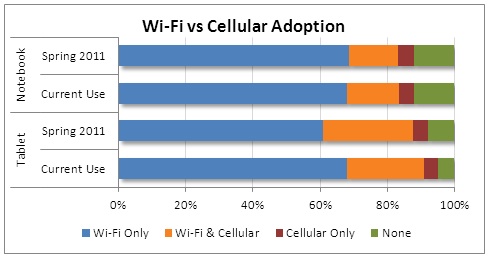
Share of Tablet Owners Utilizing Cellular Connectivity Declining

Research firm NPD today announced the results of its latest survey of tablet and notebook usage trends, finding that the share of tablet users taking advantage of cellular connectivity for their devices has declined compared to earlier this year. According to NPD's numbers, 60% of users reported using their tablets on Wi-Fi only back in April, but that number has risen to 65% over the past six months.

“There are multiple reasons for greater Wi-Fi reliance,” said Eddie Hold, vice president, Connected Intelligence. “Concern over the high cost of cellular data plans is certainly an issue, but more consumers are finding that Wi-Fi is available in the majority of locations where they use their tablets, providing them ‘good enough’ connectivity. In addition, the vast majority of tablet users already own a smartphone, which fulfills the ‘must have’ connectivity need.”
There are also many more tablets hitting the market that do not provide cellular connectivity, such as the Kindle Fire. While many early adopters opted for tablets with embedded cellular – primarily as a “future proof” play – mainstream consumers are more likely to choose a lower price point and forgo the promise of constant connectivity.

Apple's iPad is the dominant product in the tablet market, and 3G-compatible models continue to carry a $130 premium over their Wi-Fi-only counterparts. While carriers have attempted to make data access for tablets flexible by offering as-needed access without the need for a data contract, cellular data service is still not a major add-on for most consumers. With the growing prevalence of Wi-Fi and features such as mobile hotspot functionality on smartphones, it is becoming less common for users to require on-board cellular data connectivity for their tablet devices.

One development that could increase cellular data usage is shared data plans, which could allow users to draw from a single allotment of data on multiple devices. Such plans could make it easier for tablet users to sign up for occasional data usage on their tablets drawn from their current smartphone data plans, without incurring a full month's data charge for the tablet alone.

Sunday, 11 December 2011

New base iMac or MacBook pro: $1050, more


Today only, Buy.com via eBay Daily Deals has the 21.5”iMac Core i5 base configuration for $1049.99 with free chipping. That matches Best Buy’s Black Friday price (but with tax in fewer locations) and the lowest we have seen.

Buy.com also offers the base model 13”MacBook Pro for $1049.99 with free shipping. Mac Connection offers almost the same machine for $999.

Mac Mall offers a number of Closeouts on new, one generation old MacBook Airs and pros (w/$50 Restaurent.com gift card)  best buy has iPod Touch 8GB in white or black for $189 with a $30 gift card.

Saturday, 10 December 2011

How to enter an alphanumerical passcode on your iOS device


Our devices are filled with personal Data such as names and addresses for our friends and family and for our convenience we will save all our username and passwords for all kind of different services. If our device stolen? Especially previous devices like iPhone etc. when we have an iOS device stolen, thieves don’t just obtain our precious device but also obtain all the information that’s stored on it.

That’s why we secure our devices with passcode locks. But did you know you can use an alphanumeric passcode to make it even more secure?
To apply an alphanumeric passcode, open up the Settings app on your iOS device and tap on the General tab, then on Passcode Lock.
If you already have a passcode set, you’ll have to enter it in order to change the settings. If you don’t already have one, you’ll need to create one. But before you hit that button at the top that says “Turn Passcode On,” toggle the switch beneath it so that “Simple Passcode” is set to “OFF.”
Now turn on the passcode lock and create your passcode. This can be as many characters as you wish, and you can use letters — uppercase and lowercase — numbers, and symbols.

To be really secure, try to create a passcode that no one else will be able to guess. For example, don’t just use your name, or something like “abc123.” Once you’re happy, hit the ‘Next’ button in the top right-hand corner and your passcode will be applied. It will now prevent your device from being unlocked until the code is entered.

Wednesday, 7 December 2011

OnLive brings Cloud gaming service to mobile with iPad and iPhone app


OnLive has just announced a new iPad app capable of accessing their cloud game streaming service on Tech Crunch, previously only available to PC, Mac, and OnLive console owners. Launching in the US and UK first, 25 console titles have been ported to the smaller screen with touch screen controls, and almost all 200 of the service’s library of console quality titles will be playable via the $50 OnLive wireless controller.

The OnLive service allows streaming of console quality games like Assassins Creed, L.A. Noire, and other titles typically reserved for consoles like the PS3, directly from the company’s servers. The service has received mixed reviews, mostly due to inconsistencies in performance. The same appears to be true for the mobile version, with an early hands-on by TechCrunch highlighting the same performance issues common on PCs. These are “console-class” games, but not always a console quality experience. It’s playable, but really laggy.

The free app should be launching in the App Store any second now, and will still of course require that you purchase or rent the games. Fortunately, any purchased or rented content is instantly playable through any compatible device. You can check out a full list of titles that have been ported with touch controls here. IGN already got their hands on the app for iPad (video below), and they seem to have better first impressions than TechCrunch.


Flipboard for iPhone finally arrives with new social cover stories feature


Flipboard is a news app growing more popularity, now the company has decided to launch the Flipboard for iPhone also. The iPhone variant of Flipboard looks just like and functions almost like its larger iPad sibling but is obviously formatted for the iPhone’s much smaller display. Flipboard explains cover stories, its latest enhancement.
With Flipboard for iPhone we are introducing Cover stories. Think of Cover stories as a feed to check when you are in line at the coffee shop, commuting on the train or just hanging out at home. It contains a constantly updated selection of interesting articles and photos being shared with you right now. Cover stories come from all your Flipboard tiles, including social networks like Facebook, Instagram and Twitter. As you add more sources to your Flipboard, their posts will begin to appear in your Cover stories.


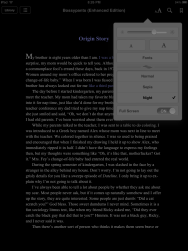
Apple updates iBooks app with new fonts and a Night reading theme


Late on Tuesday, Apple updated its iBooks iOS app with several new features, as well as including some stability and performance improvements.

iBook 1.5 adds a Night theme that turns the background black and the text white to make reading in a dark room easier on the eyes and less intrusive to anyone else who may be around you. You can still choose normal (white background, black text) or sepia (yellowish background, black text) options as well.

A new full screen option lets you get rid of the rounded corners, stacked pages, book jacket graphic and other attempts to make reading in iBooks feel like reading a printed book.

iBooks 1.5 adds four new font choices – Athelas, Charter, Lowan and Seravek and removes three Baskerville, Cochin and verdana in the process.

Apple also mentions new classic covers for public domain books and a redesigned annotation palette makes it easier to choose a color for your highlighted text.

iBooks 1.5 is a free download from the iTunes Appstore.

Tuesday, 6 December 2011

Apple in the enterprise: Breaking Microsoft’s Grip

When Microsoft wanted to show off mid-market affinity, the software giant would do a promotional video with lifetime products, a manufacturer of polyethylene folding tables, chairs and sports equipment. Until about two years ago, Lifetime was Microsoft’s mid-market darling. Then what’s changed?

The lifetime CIO John Bowden has began adopting iPhones and iPads recently and made a bottom line that Apple makes great products and also says that “We love Apple”. To truly understand how monumental his decision was – “Wow, John is really doing this!” said employees. A little background is in order. When it comes to technology enabling people, Lifetime is one of the most conservative companies out there.

Bowdon has a stranglehold on corporate data via a virtual desktop infrastructure or VDI. He has disabled USB ports on laptops and deployed digital rights management software. He continues to force employees to check out web sessions and monitors just about every digital transaction with Lifetime’s servers.

During Lifetime’s early interactions with Chinese manufacturers, the company has been burned by intellectual property theft.

Such a Fort Knox approach practically demands the use of only a handful of venders whose products work together like bricks in a wall. That’s why Lifetime chose to build its fortress with Microsoft products.  Lifetime works closely with Microsoft in product development and in testing for the midmarket. Bowden visits the Redmond campus regularly. He says “Then came Apple’s disruptive technology.” His decision to adopt consumer aimed iPhones and iPads is simply stunning. The thinking goes, if Apple can break Microsoft’s grip on a place like Lifetime. Then no company is safe from Apple in the enterprise.

Apple inspiration....Redmond?

Bowden began his Apple adventure with the iPhone 3 more than two years ago and the iPad 2 recently. The iPhones replaced Microsoft Windows Mobile 6.X phones even though Lifetime still participates in Microsoft’s Windows Phone rapid adoption program. iPad’s Airplay Mirroring allows sales and marketing people to wirelessly hook up to an HD TV and give presentations on the fly. Today Lifetime has a couple hundred iPhones and iPads each.

It has also adopted Apple product in other ways. The company has an app on the Appstore called Lifetime products that basically replaces all of its catalog sheets that sales people use. Moreover, Lifetime is installing Apple TV’s in its conference rooms.

So what does Microsoft thinks about such a Traitorous tech move? Here in lies the irony: the inspiration for Apple devices at Lifetime came from Microsoft itself.

Bowden says that “I remember sitting in a Microsoft office up in Redmond working on the exchange 2010 rapid adoption program”. He also says that the exchange product group was willing to make exchange compatible with more than just windows devices and you would be surprised how many of the exchange group deep inside Microsoft had iPhones.

Despite Microsoft CEO Steve Ballmer making it clear he doesn’t want Microsoft employees carrying iPhones, thousands are concealing iPhones in their pockets. Some 10 percent of Microsoft’s global workforce have iPhones, according to March 2010 article in the Wall street journal. Given iPhone’s phenomenal growth in the market since, chances are even more Microsoft employees are packing iPhones.

Bowden returned to Lifetime’s headquarters in an industrial district near Salt Lake City with an urgent message. Borden says “We can’t ignore the iPhone any longer” he says. Moreover, Microsoft was willing to work with Lifetime to test ActiveSync support for iPhone 3, the iPhone platform at the time. T-mobile also became deeply involved despite that fact that the wireless carrier doesn’t officially carry iPhones.”

Consumer gadgets test a CIO’s courage.

There is no question that implementing consumer gadgets like the iPhone and iPad will test a CIO’s mettle.
The soft-spoken Bowden projects a measured demeanor not typical of a man willing to push boundaries. Yet Bowden has made more than 30 trips to china checking up on Lifetime’s operations there. He has come face to face with China’s underbelly of deadly copycat manufacturers. For stress relief, Bowden flies a helicopter in Utah’s formidable Wasatch mountain range.

The danger of adopting iPhone and iPads, of course, pastel in comparison. Nevertheless, Bowden faced his share of internal challenges. Borden says “there were areas of IT that were resistant to the change.”
To motivate his IT staff to embrace consumer gadgets, he tapped in to the techie mindset and said “leading geeks is a little bit different in that they really want to see their technical side grow”.

6 months ago, Bowden encouraged and rewarded each of his 31 state-side IT staff to get a consumer gadget for personal use, become familiar with it and share what they learned with the rest of the team.

Every IT staffer participated, buying mostly Apple iPads and iPhones, some Android phones and tablets and a few laptops. Techies seemed to gravitate toward the Samsung Galaxy Tab because of its openness they could have at it. Not a single Blackberry phone or playbook made the list.

“We really admire their choice and knowledge around their gadgets, and so it was pretty magical,” Bowden says. “There was a lot of positive feedback.”

.”Meanwhile, Lifetime executives and sales people love their iPhones and iPads (although Bowden is quick to point out that the company still uses a lot of Microsoft gear). The shift to Apple products represented a culture shock for IT that challenged the CIO to come up with ideas like the consumer gadget learning project to grease the wheels of consumer IT.But that’s all part of the job.“You have to keep your eyes open out there,” Bowden says. “What use is it for the CIO to put their head in the sand?”

Monday, 5 December 2011

How to Print Directions from the Maps app in iOS5

Here are some of the hints and tips for iOS 5.Having the Maps app on the iPhone is a lifesaver for me. Not only does it help me navigate my way around places I don’t know, but it’ll also tell me how to get there when I leave the house.
However, trying to read directions from an iPhone while driving isn’t ideal, and it’s certainly not safe. Fortunately, iOS 5 allows you to print your directions from directly within the Maps app as long as you have a printer compatible with AirPrint. Here’s how!
To do this, open up the built-in Maps app and begin by tapping the ‘Directions’ button at the bottom. By default, your directions will automatically start from your current location, and the app will assume you’re driving a car. But you can change these if necessary.

 
Once you’ve told the app where you want to go, simply hit the ‘Route’ button in the top right-hand corner. The app will then calculate your route and present you with your directions.


Now tap the options button in the bottom right-hand corner. Your map will curl up and you’ll find there’s a ‘Print’ button underneath — tap this!
Now you can select your printer. It must be compatible with AirPrint or your iPhone will not find it. However, you can use an application such as Printopia on your Mac to connect to standard printers.


Once you’ve selected your printer and the number of copies you’d like to print, simply hit the print button and your directions will be on their way.


Syria bans the iPhone


It is not often that we agree with totalitarian regimes who have fondness for turning their military on their citizens, but this time the Syrians seem to have come up with a good idea.

In a desperate bit to stop people revolting, the Syrian government has decided to ban iPhones. In a statement apparently issued by the customs department of the Syrian finance Ministry and seen by Lebanese and German Media, the authorities “warn any one against using the iPhone in Syria”. The order also apparently prohibits the import of iPhones.
It is not clear why the iPhone has been singled out and not anything like android. If the move is to stop activities from filming Syrian government atrocities and posting them online, you can equally do that without needing an iPhone. Android gear does the job just as efficiently and cheaper. Yet if you believe the BBC only the iPhone is being banned.
If the document posted on the Lebanese news website el-Nashra is genuine, the authorities threaten confiscation and prosecution for anyone found with an iPhone. It could not be biased reporting from the BBC which only thinks that there is one breed of Smartphone out there and that is one which has been officially blessed by the late Steve Jobs. In the UK if the BBC was seen to be biased in favour of one product, then it could be in a lot of hot water.
According to the customs announcement, which we had translated, it only mentions the iPhone, which means that Syrian authorities are too dim to know that there are other Smartphones out there, they just doesn’t like Job’s Mob that much.

Friday, 2 December 2011

Apple patent details digital handshakes using advanced cameras and invisible inks


Patently Apple points to a patent application from Apple published today that reveals the company’s research of innovative methods and enactments for establishing communication between neighboring devices towards resolve data transmission. In its application, Apple recommends by using camera system try to identify the marks such as barcodes or even invisible ink to permit devices to identify each other.


For instance, every device can display a seed to be identified from an image taken by another device. With the use of extracted keys or seeds, each of devices can produce, using a identical process, and same digital handshake key. The digital handshake key can then be used to express a secure communication path between those two devices and share information securely.

Apple defines a hundreds of settings in which users might wish to rapidly launch a secure connection between devices, either for social networking or for gaming to retail transactions.
Furthermore, Apple defines how users could rapidly log into a device such as a computer by using a digital handshake initiated from another device such as an iPhone.

The patent application was filed in May 2010 and is credited to Apple user interface designers Marcel Van OS and Caroline Cranfill.

For any clarifications or suggestions, please leave comments…

Here’s how you can try out Windows Phone on your iPhone


Excited to see how Windows Phone feels, but do not have a device around to do so? Us neither. But a new HTML 5 website that has just been released by Microsoft allows iPhone and Android users to get a taste of the Windows Phone 7 (Mango 7.5) operating system. To do a trial users need not to download or register, just they can try it out by going to the http://aka.ms/wpdemo webpage on their mobile device.

However it does not use any of the data on your phone like your contacts, the demonstrator show you a pretty inclusive look at all of Windows Phone’s features. Microsoft guide you around the operating system through a blue dot, and apparently certain features like voice recognition just do not work in the browser. Drat, that is something we really wanted to try.

Will this draw users over to the Windows Phone platform? Probably not, but it’s always cool to see what the competition is up to.

Here’s how you can try out Windows Phone on your iPhone


Excited to see how Windows Phone feels, but do not have a device around to do so? Us neither. But a new HTML 5 website that has just been released by Microsoft allows iPhone and Android users to get a taste of the Windows Phone 7 (Mango 7.5) operating system. To do a trial users need not to download or register, just they can try it out by going to the http://aka.ms/wpdemo webpage on their mobile device.

However it does not use any of the data on your phone like your contacts, the demonstrator show you a pretty inclusive look at all of Windows Phone’s features. Microsoft guide you around the operating system through a blue dot, and apparently certain features like voice recognition just do not work in the browser. Drat, that is something we really wanted to try.

Will this draw users over to the Windows Phone platform? Probably not, but it’s always cool to see what the competition is up to.

Wednesday, 30 November 2011

iOS 5.1 roundup: referenced for new iPhone, iPad, Apple TV, minor tweaks


Yesterday was iOS 5.1 day, and it was the news all about related to the release of new beta. Customers would not find any extra new features in the operating system, but this release was precious for those who are interested in the iOS hardware future. Here is out summary of the new devices found in iOS 5.1:

-The Sixth-generation iPhone:


Situated deep inside the file system of iOS 5.1 is a reference to an iPhone 5,1. As clarified yesterday, the jump from 4, 1 to 5, 1 represents a huge leap and of course a major internal change which means that iPhone 5/6 would come with a brand new processor. The expected external changes would be a 4 inch display with a new aluminum casing. The A6 in all prospects.

-The iPad 3 and new iPad 2:


Situated deep inside the file system is a reference to a new-generation iPad, the third iPad 3 model, possibly a carrier dissimilarity, known as iPad 3,3. The more interesting with an iPad 2,4 reference is  an updates to iPad 2 that is either a carrier variation, a GSM+CDMA dual-mode device, a Sprint iPad 2, or something wholly new.

- The next Apple TV:


The iOS release says that as a product in development moves even faster to launch, it has been assigned with a proper codename. Just not only an identifier like “3,1” but also assigned a codename such as N94 (iPhone 4S) or K48 (original iPad). The next-generation Apple TV moved to that step. Thanks to beta release of iOS 5.1, we have codename in our hands for this new Apple TV(3,1). Upcoming Apple TV to feature low-power Bluetooth 4.0 technology opens door to new, more advanced input devices.

New user Features:


There is hardly anything noticeable save for iTunes Match streaming over 3G and tremendously minor keyboard enrichment in the iOS Mail application. Apple is also more open about geo-fencing (such as in Reminders.app) in the location services preferences.